Spreadsheet inventory
Recorded quantities drift from physical stock.
FIELD DATA -> BUSINESS DATA
SERION supplies and installs industrial printers, scanners, mobile computers, and tablets, integrates their data with your business systems, and stays responsible for operation and maintenance after launch.
Free · Email reply within 2 business days · No sales calls
CONNECT · OPERATE · RECORD · INTEGRATE
THE DELAY
When data breaks between equipment, spreadsheets, and ERP, the cause of an error and the evidence needed to respond disappear with it.
Recorded quantities drift from physical stock.
No record of who printed which label and when.
Field work is re-entered manually or posted late.
Insufficient scan and inspection evidence causes mis-shipments.
Items, lots, and serial numbers are difficult to trace.
Equipment failures, inspections, and repairs live in separate places.
HOW IT WORKS
Each scan and device action becomes a receiving, production, inspection, or label record connected to the systems you already use.
Connect printers, scanners, industrial mobile computers and tablets, RFID, scales, and vision equipment.
Run receiving, shipping, inventory, production, inspection, labeling, and service.
Store lot, serial, operator, time, location, and print history.
Exchange data with ERP, MES, WMS, accounting, spreadsheets, and APIs.
MODULES
Keep the equipment and systems that still work, connect the work you need now, and expand in phases.
Choose the field problem to inspect. Nothing advances automatically.
01 / 04SCAN → VERIFY → STOCK
SERION Stock
Connect every scan from receiving to shipment with stock, and retain who handled what, where and when.
Connected work
Built and operating evidence
SERION Stock · Track · Trace · StyleSnap · StoreSnap
02 / 04DATA → PRINT → TRACE
SERION Label
Bind item, lot and shipment identifiers to barcode and QR output, retaining issuance and reprint records.
Connected work
Built and operating evidence
SERION Label · Trace
03 / 04DEVICE → SERION → ERP
SERION LINK
Deliver readings from printers, scanners, industrial mobile computers and tablets, RFID, scales and vision equipment to the ERP, MES or WMS already in use.
Connected work
Built and operating evidence
SERION LINK · PARTEX · ERP
04 / 04ASSET → INSPECT → HISTORY
SERION Care
Keep site, condition, scheduled inspection, incident, repair and parts replacement records connected to each customer asset.
Connected work
Built and operating evidence
SERION Care · asset and service delivery experience
One field technology company, from supply through maintenance.
HARDWARE
Field equipment
We supply and install printers, scanners, industrial mobile computers and tablets, RFID readers, labels, ribbons, vision cameras, and industrial PCs.
SOFTWARE
Our own software
From label printing to the systems that run the floor — built in-house, not outsourced.
SOLUTIONS
Operating solutions
WMS, MES and AMS, shaped to how the site actually works.
SERVICE
Operation and maintenance
The same team continues with stabilization, incident response, inspection, and improvement after installation.
SEE IT
Rather than describe it — here it is.
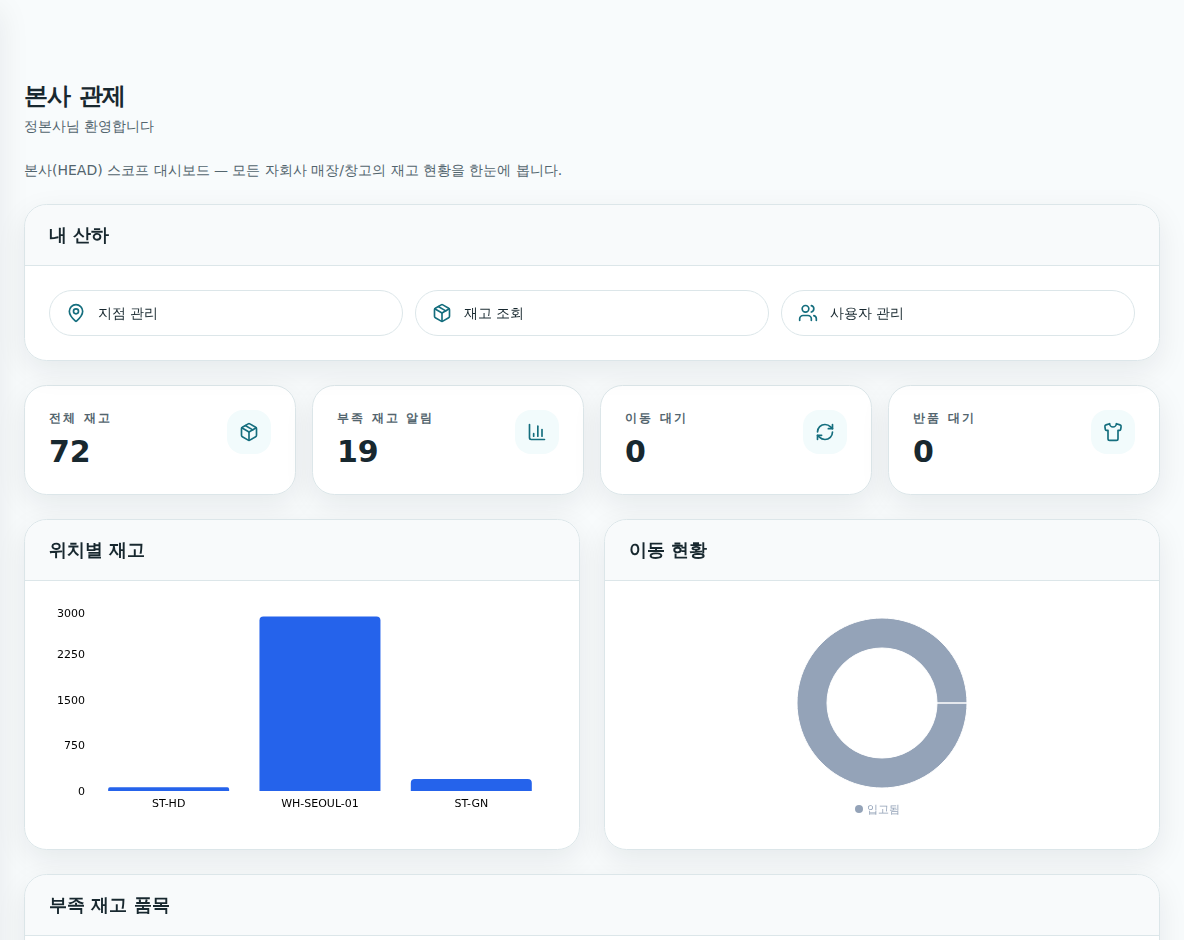
Management sees the floor as it happens
Total stock, low-stock alerts, pending transfers and returns on the first screen. Stock by location and transfer status appear in the operating view, not in a separate report.
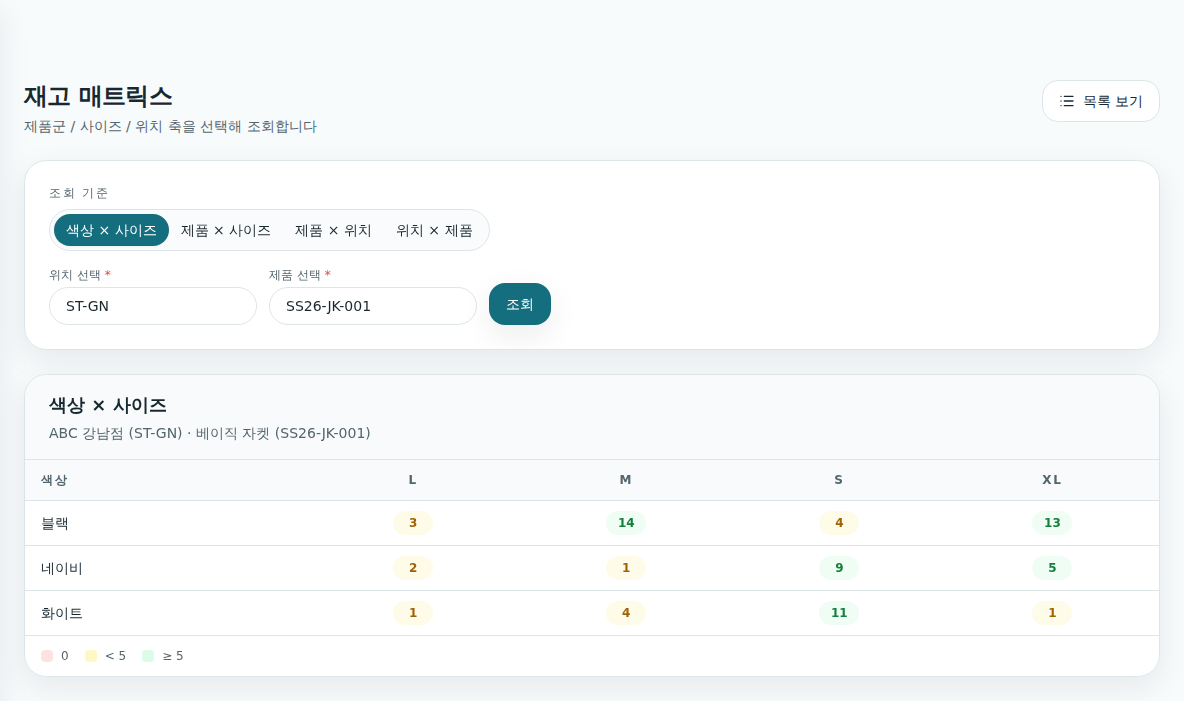
The style–colour–size claim is a screen, not a sentence
Apparel stock across style, colour and size. Switch the axes — colour × size, product × location — and see which cell is empty.
Traceability reaches the individual item
Every variant of one product, its stock by location, and its history, on one screen.
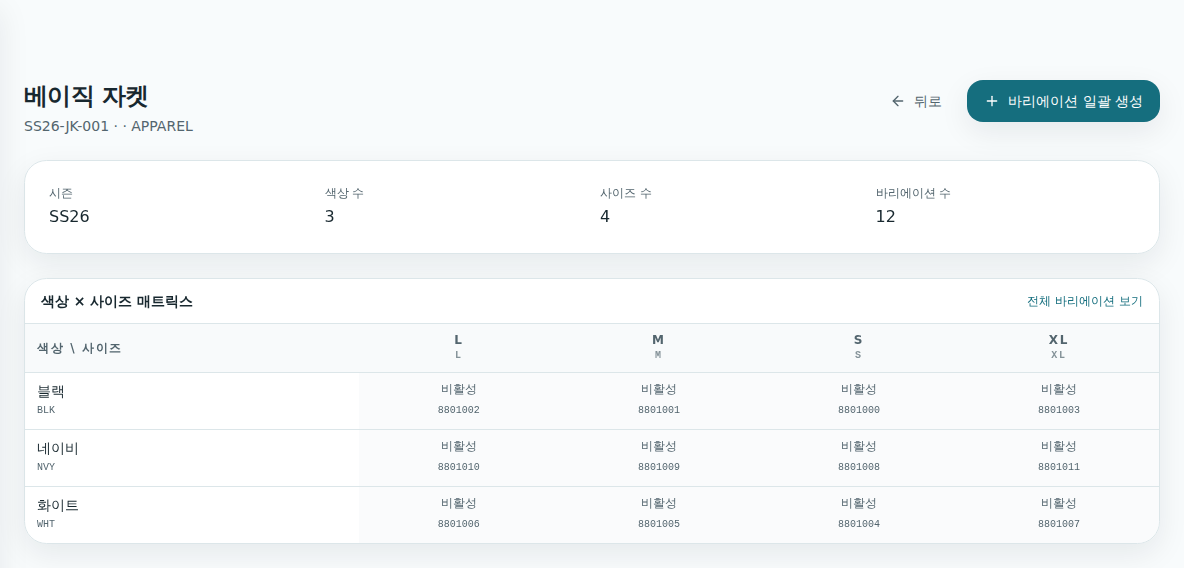
Store names, product codes and quantities in these screens are demonstration data. They are not a customer’s figures.
WHERE IT RUNS
Capture the required data at the production line, warehouse, label station, asset, or service site where it originates.
Connect production results, lots, labels, defects, and shipping data.
Reduce receiving, location, picking, inspection, and shipping errors.
Manage barcode and QR templates with complete print history.
Track asset location, status, inspection, and movement history.
Manage customer equipment, service, parts replacement, and scheduled inspections.
Deliver field data to ERP, MES, WMS, spreadsheets, and APIs.
ALREADY BUILT
Systems designed by a team that understands both field equipment and business software, then stayed through operation.
SERION technology assets built for repeatable delivery and continuous improvement.
From receiving to shipment: what is where, and how much
Tracks goods from receiving to departure by carton, pallet and container.
From order to production execution
Connect production, inventory, quality and equipment modules to web operations and field-device workflows.
Equipment assets and service history
Asset history, repairs and scheduled inspections for field equipment.
Label issuance and print history
Design labels, print them through field devices, and retain issuance, reprint and disposal history as one governed flow.
The layer that exchanges data with the systems you already run
Inventory, logistics, production, procurement, sales and accounting as modules that talk to your systems.
Connect barcode, RFID, scales, vision, sensors and printers through shared contracts and a central hub.
How does the data get off the floor?
How does it connect to our ERP?
What about permissions and audit?
Where does it run, and who installs it?
BEFORE / AFTER
Reduce duplicate entry while retaining clearer evidence for every exception and incident.
Before
Receipts and shipments recorded in spreadsheets
After
Receipts and shipments recorded by barcode scan
Before
No label print history
After
Operator, time, item, and lot history retained
Before
ERP stock differs from physical stock
After
Inventory updated from field data
Before
Lot tracing is difficult
After
Lot and serial-level traceability
Before
Service history is scattered
After
Maintenance history managed by equipment
Before
Manual inspection
After
Scan-based inspection evidence
THE HARDWARE LAYER
One field technology company takes responsibility for equipment selection and supply, installation, system integration, and ongoing maintenance.
Equipment at the point where data is created.
Turn captured values into business records and retain history.
Send data using the integration method your systems support.
One team handles industrial printer, scanner, mobile computer, and tablet supply, on-site installation, system integration, incident response, and maintenance.
HOW WE START
We stay responsible from field assessment and equipment selection through installation, integration, stabilization, and maintenance.
STEP 01 / 05
Review workflows together with existing equipment, ERP, and network conditions.
STEP 02 / 05
Identify reusable equipment, required additions, captured data, and delivery paths.
STEP 03 / 05
Define the Stock, Label, LINK, and Care modules needed now and the order of adoption.
STEP 04 / 05
One team handles equipment setup, ERP and API integration, and on-site commissioning.
STEP 05 / 05
Respond to incidents and improve operations using records from real use.
QUESTIONS
Review equipment reuse, phased adoption, ERP integration, and incident ownership.
START HERE
Start with the equipment, ERP connection, or workflow causing the most delay.
We carry your selected interest into the request and propose what to retain, improve, and do next.
Confirm which printers, scanners, industrial mobile computers, and tablets can stay and how to connect them.
Check equipment connectionConfirm the data path that will deliver scans and work results to ERP, MES, or WMS.
Check ERP integrationChoose the receiving, shipping, location, lot, or serial record that should be connected first.
Find the inventory starting pointFree · Email reply within 2 business days · No sales calls